Python's Data Types
CSCI 1470
by K. Yue
1. Python Data Type
Example: for
i = 32
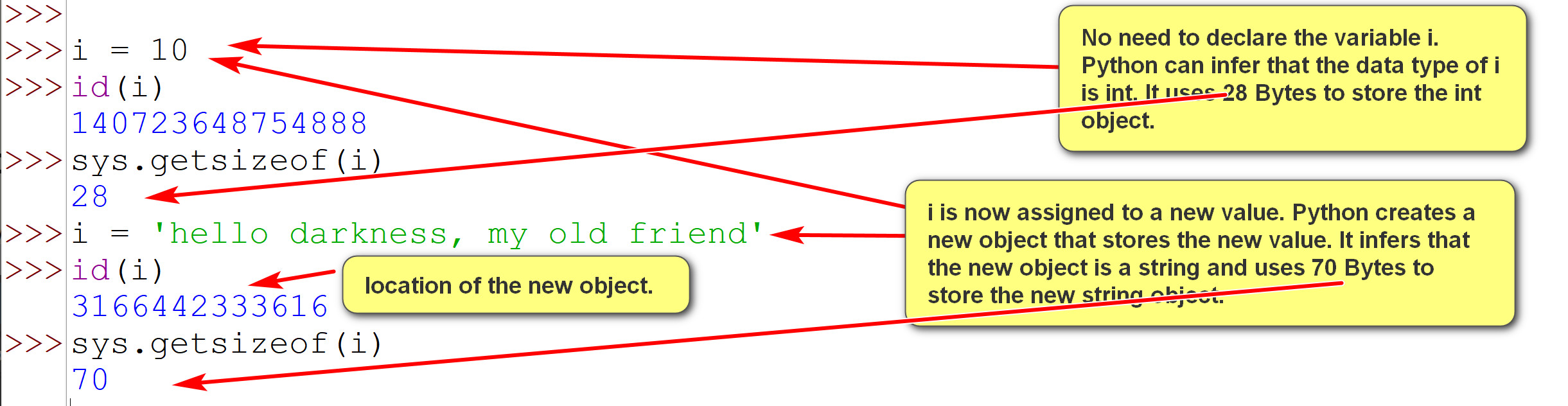
How are the data type int stored? Java:
Python:
>>>import sys
|
Example:
1.1 Important Python Data Types
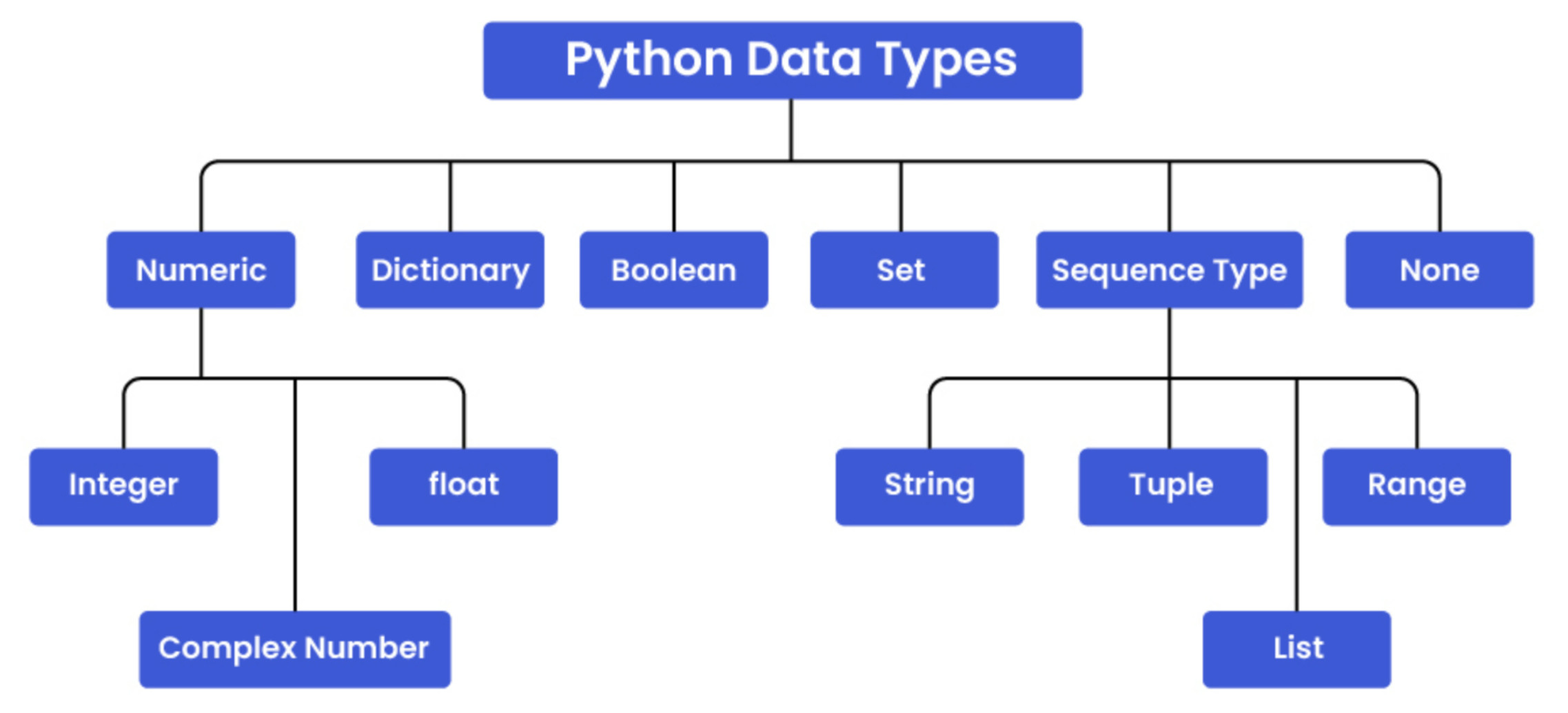
The following diagram shows the most common data types in Python:
For comparison, Java:
|
1.2 Type Classifications
1.2.1 Primitive versus Composite Type
Example:
# Primitive/atomic types
i = 1
pi = 3.14159265
t = True
s = None
# Composite types:
l = [1,2,3,4] # a list.
l[0]
1
m = (4,5,6,7) # a tuple
m[0]
4
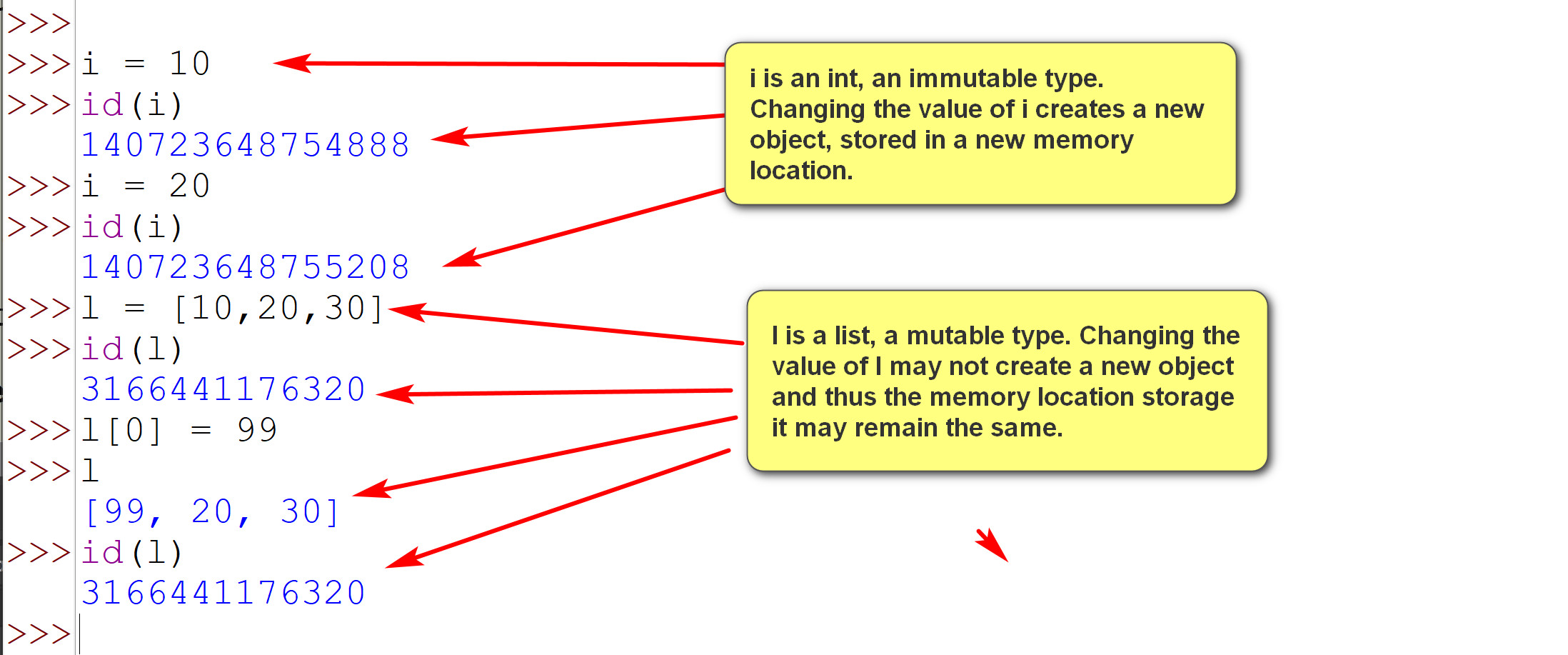
1.2.2 Mutable vs Immutable Types (advanced topic)
2. Internal Representations In Bits and Bytes
Example:
A byte may contain 00101010.
Example:
Binary: 101010 -> Hexadecimal: 2A
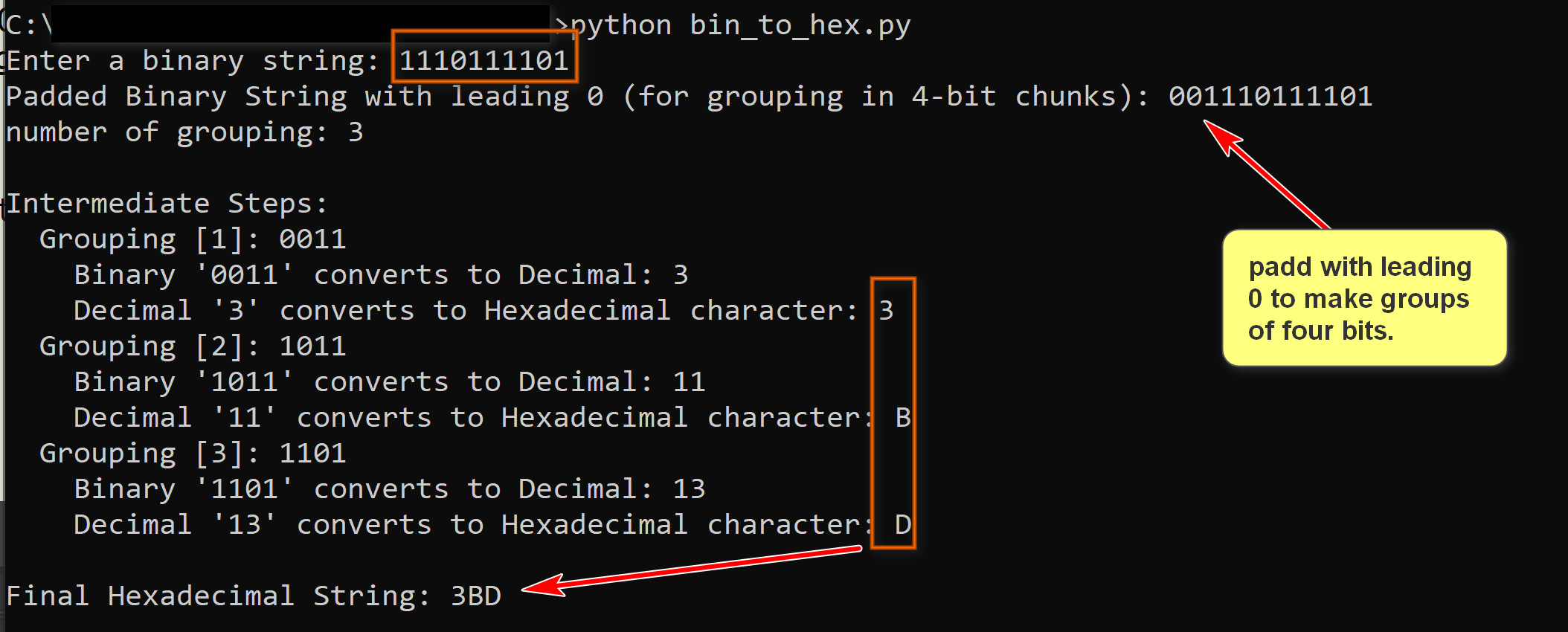
Binary: 1110111101 ->
Hexadecimal: 3BD
Conversion of binary value to hexadecimal value:
bin_to_hex.py: converts an input binary value to a hexadecimal value. Please download and play with it. You do not need to fully understand the program at this time.
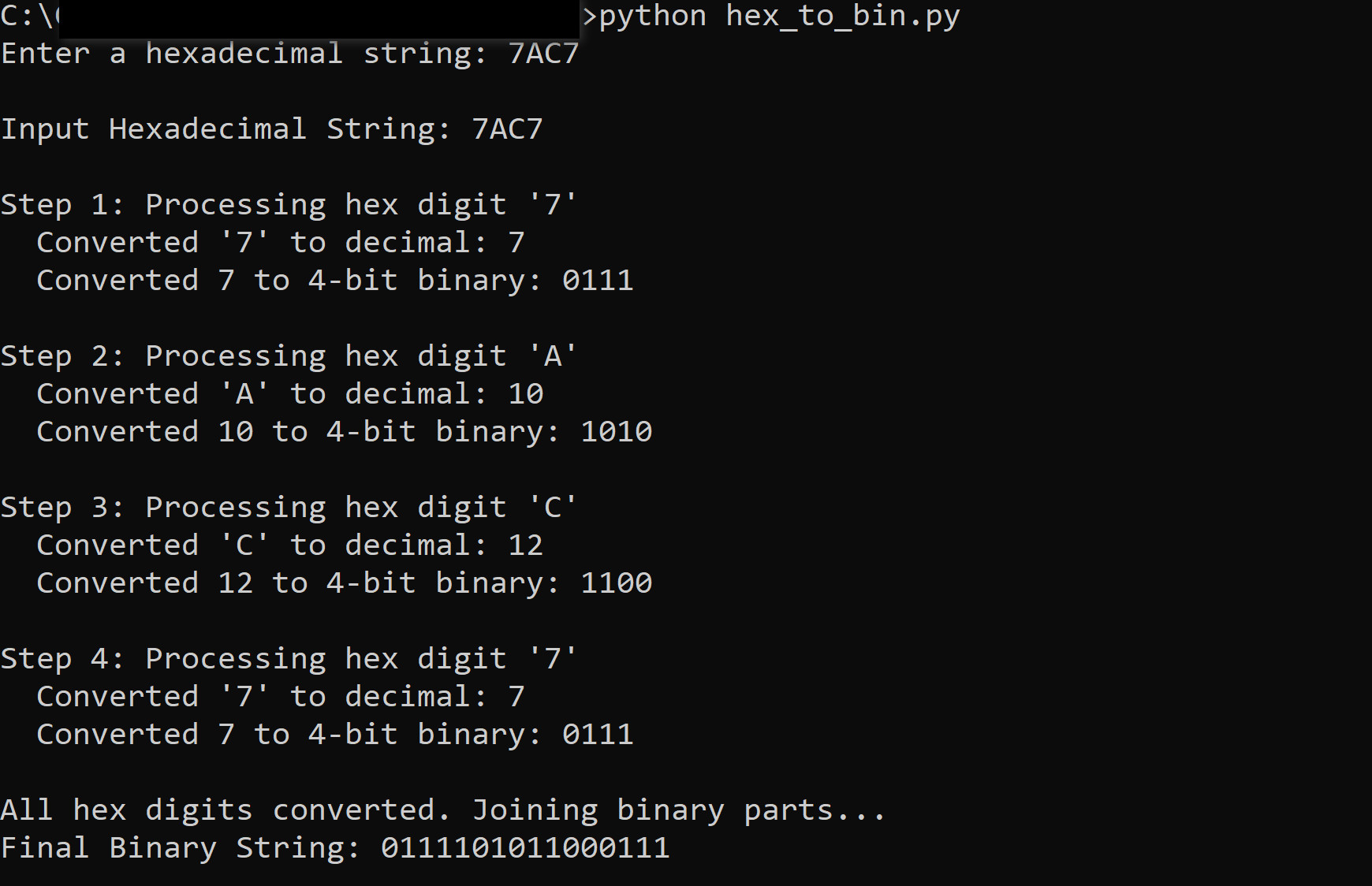
Conversion of hexadecimal value to binary value:
hex_to_bin.py: converts an input hexadecimal value to a binary value. Please download and play with it. You do not need to fully understand the program at this time.
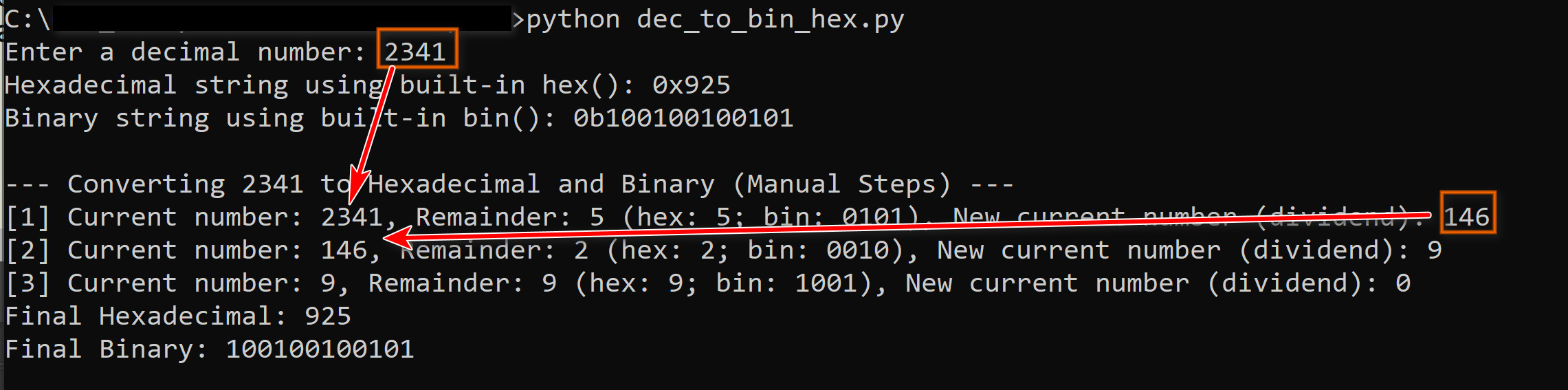
Conversion of decimal values to binary and hexadecimal values
You do not need to fully understand the following algorithm.
Algorithm Convert(i, b) |
dec_to_bin_hex.py: converts an input decimal value to a binary string and a hexadecimal string. Please download and play with it. You do not need to fully understand the program at this time.
Example:
Three common data types:
Example:
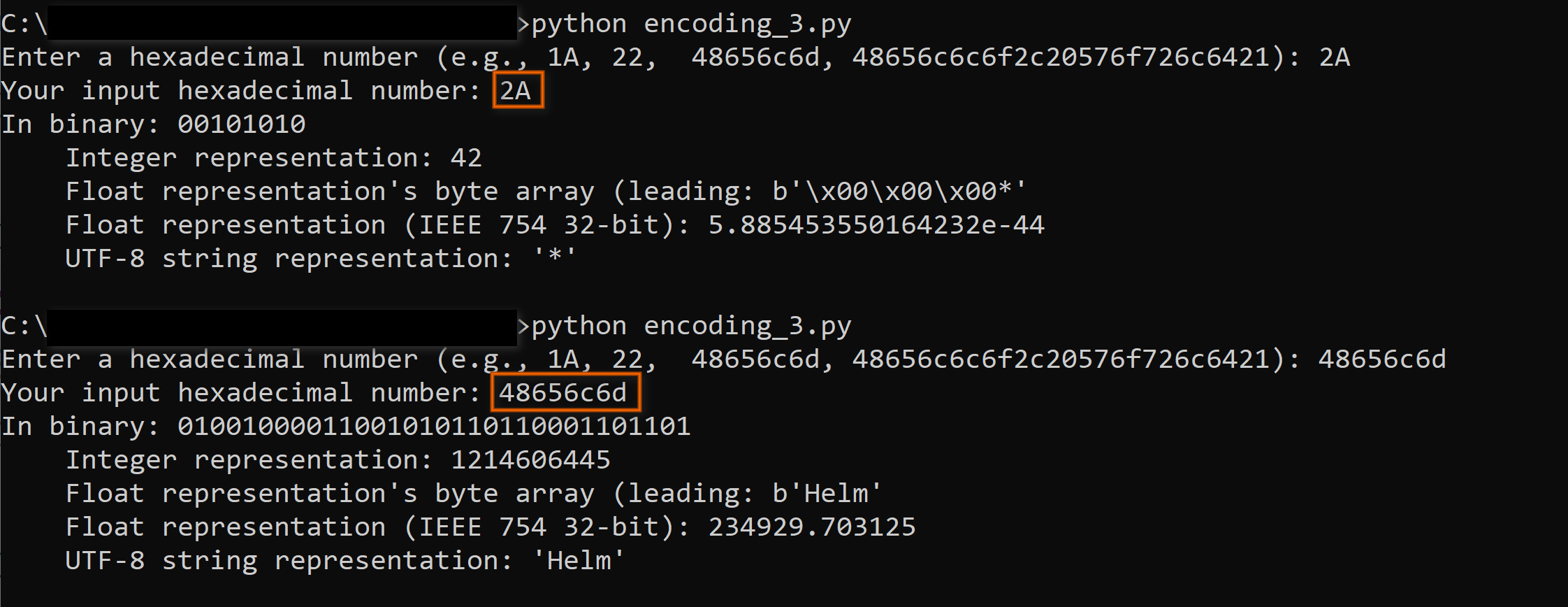
The Byte 00101010:
encoding_3.py: input a hexadecimal number and show how it may be interpreted as integer, float and UTF-8 strings. Please download and play with it. You do not need to fully understand the program at this time.
Example:
3. Common types
3.1 int
# int types
# int arithmetic operators.
a = 20
b = 3
print(f"a: {a}")
print(f"b: {b}")
print(f"a+b: {a+b}")
print(f"a-b: {a-b}")
print(f"a*b: {a*b}")
print(f"a/b: {a/b}")
print(f"a//b: {a//b}")
print(f"a%b: {a%b}")
print(f"a**b: {a**b}")
c = a/b
print(f"type(a): {type(a)}")
print(f"type(b): {type(b)}")
print(f"type(c): {type(c)}")
# int assignments.
x = 4
print(f"x: {x}")
x += 2
print(f"after x+= 2; x: {x}")
x -= 3
print(f"after x-= 3; x: {x}")
x *= 6
print(f"after x*= 6; x: {x}")
x %= 4
print(f"after x%=4; x: {x}")
# Comparisons operators
p = 5
q = 7
print(f"p > q: {p > q}")
print(f"p >= q: {p >= q}")
print(f"p == q: {p == q}")
print(f"p < q: {p < q}")
print(f"p <= q: {p <= q}")
# bitwise operation.
s = 5 # binary: 0101
t = 3 # binary: 0011
print(f"s: {s}; binary: {s:08b}")
print(f"t: {t}; binary: {t:08b}")
print(f"s & t: {s & t}; binary: {s&t:08b}") # bitwise and
print(f"s | t: {s | t}; binary: {s|t:08b}") # bitwise or
print(f"s ^ t: {s ^ t}; binary: {s^t:08b}") # bitwise exclusive or
print(f"s<<1: {s<<2}; binary: {s<<2:08b}") # shift left 1 bits.
3.2 float
Example: In IDLE:
>>> 1/3
0.3333333333333333
>>> 0.1 + 0.57
0.6699999999999999
>>> 0.1 + 0.2
0.30000000000000004
Some float operators (similar to int):
3.3 str
3.4 list
Example:
list_1.py: download and try it out. Use the techniques in the program to tinker and explore lists.
# some basic list examples.
l = [10,20,30]
m = [30,20,10]
print(f"l: {l}")
print(f"m: {m}")
print(f"m[0]: {m[0]}")
print(f"m[1]: {m[1]}")
print(f"m[2]: {m[2]}")
print(f"l==m: {l==m}")
print(f"l==[10,20,30]: {l==[10,20,30]}")
# no need to know for the moment: lexicographical comparison on lists.
print(f"l>m: {l>m}")
print(f"m>l: {m>l}")
# append: add to the end.
print("""l.append(20)
l.append(30)
l.append(20)""")
l.append(20)
l.append(30)
l.append(20)
print(f"l: {l}")
print(f"len(l): {len(l)}")
print(f"l.count(20): {l.count(20)}")
print(f"l.reverse(): {l.reverse()}")
print(f"l+m:{l+m}")
p = [1, 'hello', 1.89e40, [3+10, 'world']]
print(f"p: {p}")
print(f"p[0]: {p[0]}")
print(f"p[1]: {p[1]}")
print(f"p[2]: {p[2]}")
print(f"p[3]: {p[3]}")
print(f"p[3][0]: {p[3][0]}")
print(f"p[3][1]: {p[3][1]}")
q = [10,20,30]
print("lists are mutable")
print(f"q: {q}")
print(f"id(q): {id(q)}")
print("q.pop()")
q.pop()
print(f"q: {q}")
print(f"id(q): {id(q)}")
print("int are immutable")
i = 1
print(f"i: {i}")
print(f"id(i): {id(i)}")
i = 20
print(f"i: {i}")
print(f"id(i): {id(i)}")
3.5 tuple
Example:
tuple_1.py: download and try it out. Use the techniques in the program to tinker and explore tuples.
# some basic tuple examples.
l = (10,20,30)
m = (30,20,10)
print(f"l: {l}")
print(f"m: {m}")
print(f"m[0]: {m[0]}")
print(f"m[1]: {m[1]}")
print(f"m[2]: {m[2]}")
print(f"l==m: {l==m}")
print(f"l==[10,20,30]: {l==[10,20,30]}")
# no need to know for the moment: lexicographical comparison on lists.
print(f"l>m: {l>m}")
print(f"m>l: {m>l}")
""" Methods changing lists do not exist for tuples. E.g.,
# append: add to the end.
print(l.append(20)
l.append(30)
l.append(20))
l.append(20)
l.append(30)
l.append(20)
"""
print(f"l: {l}")
print(f"len(l): {len(l)}")
print(f"l.count(20): {l.count(20)}")
print(f"l+m:{l+m}")
p = (1, 'hello', 1.89e40, (3+10, 'world'))
print(f"p: {p}")
print(f"p[0]: {p[0]}")
print(f"p[1]: {p[1]}")
print(f"p[2]: {p[2]}")
print(f"p[3]: {p[3]}")
print(f"p[3][0]: {p[3][0]}")
print(f"p[3][1]: {p[3][1]}")
q = (10,20,30)
print("tuples are immutable")
print(f"q: {q}")
print(f"id(q): {id(q)}")
print(
"""ql = list(q)
ql.reverse()
ql.append(90)
q = tuple(ql)""")
print("If really, really need to change a tuple, convert it to a list.")
ql = list(q)
ql.reverse()
ql.append(90)
q = tuple(ql)
print(f"q: {q}")
print(f"id(q): {id(q)}")
3.6 bool
Example:
bool_1.py: download and try it out. Use the techniques in the program to tinker and explore the bool type.
# some basic bool examples.
x = True
y = False
print(f"x: {x}")
print(f"y: {y}")
print(f"not(x): {not(x)}")
print(f"x and y: {x and y}")
print(f"x and not y: {x and not y}")
print(f"x or y: {x or y}")
print("Short circuit evaluations")
li = [10,20]
print(f"li[1]: {li[1]}")
if li[1]:
print(f"li[1]: true")
else:
print(f"li[1]: true")
k = 4
print(f"k: {k}")
try:
if li[k]:
print(f"li[k]: true")
except IndexError:
print("Index out of range error for li[k]")
try:
if x or li[k]:
print(f"x or li[k]: true")
else:
print(f"x or li[k]: false")
except IndexError:
print("Index out of range error for 'x or li[k]'")
try:
if x and li[k]:
print(f"x and li[k]: true")
else:
print(f"x and li[k]: false")
except IndexError:
print("Index out of range error for 'x and li[k]'")
try:
if y and li[k]:
print(f"y and li[k]: true")
else:
print(f"y and li[k]: false")
except IndexError:
print("Index out of range error for 'y and li[k]'")
try:
if y or li[k]:
print(f"y or li[k]: true")
else:
print(f"y or li[k]: false")
except IndexError:
print("Index out of range error for 'y or li[k]'")
3.7 NoneType and None
Advanced topic (not in examination): None or Null are handled differently in different languages: In Java, null is a special literal representing a missing value of a reference to objects or reference types. It is not available for primitive types, such as int and float. For example, if i is an integer, i = null is not allowed. In SQL, null is a value/marker that can be used in all data types. Thus, if x is null, you can compare it to an integer, such as 'x < 3', which will return null. In Python, None is an object of the type NoneType. Thus, if x is None, comparison such as 'x < 3' raise a TypeError exception. |
3.8 dict
Example:
dict_1.py: download and try it out. Use the techniques in the program to tinker and explore dict.
# some basic dict examples.
d1 = {}
print(f"d1: {d1}")
print(f"id(d1): {id(d1)}")
print(
"""d1['a'] = 100
d1[2] = 'hello, world'""")
d1['a'] = 100
d1[2] = 'hello, world'
print(f"d1: {d1}")
print("d1['a'] = [10,20,30]")
print(f"d1: {d1}")
print(f"d1['a']: {d1['a']}")
print(
"""d1['a'] = 50
d1[1.33] = 90
d1['hello'] = 3.1415""")
d1['a'] = 50
d1[1.33] = 90
d1['hello'] = 3.1415
print(f"d1: {d1}")
# KeyError: key does not exist in the dict.
try:
print(f"d1['world']: {d1['world']}")
except KeyError:
print("key error for d1['world']")
# Use the get() to avoid raising KeyError if the key does not exist.
print(f"d1.get('a'): {d1.get('a')}")
print(f"d1.get('world'): {d1.get('world')}")
# key exists?
print(f"'hello' in d1: {'hello' in d1}")
print(f"'world' in d1: {'world' in d1}")
print(f"id(d1): {id(d1)}")
d2 = {'a': 100, 'b': 'hello', 'c': 1.25, 'd': 40}
print(f"d2: {d2}")
# setdefault: set a key to a value only if it does not already exist.
print(f"d1.get('e'): {d1.get('e')}")
print("d2.setdefault('e', 'orange juice')")
d2.setdefault('e', 'orange juice')
print(f"d1.get('e'): {d1.get('e')}")
print(f"d1.get('a'): {d1.get('a')}")
print("d2.setdefault('a', 'apple juice')")
d2.setdefault('a', 'apple juice')
print(f"d1.get('a'): {d1.get('a')}")
# remove a key-value pair.
print(f"d2: {d2}")
print("del d2['c']")
del d2['c']
print(f"d2: {d2}")