Files
CSCI 1470
by K. Yue
1. File Basics
2. Streams and I/O Streams
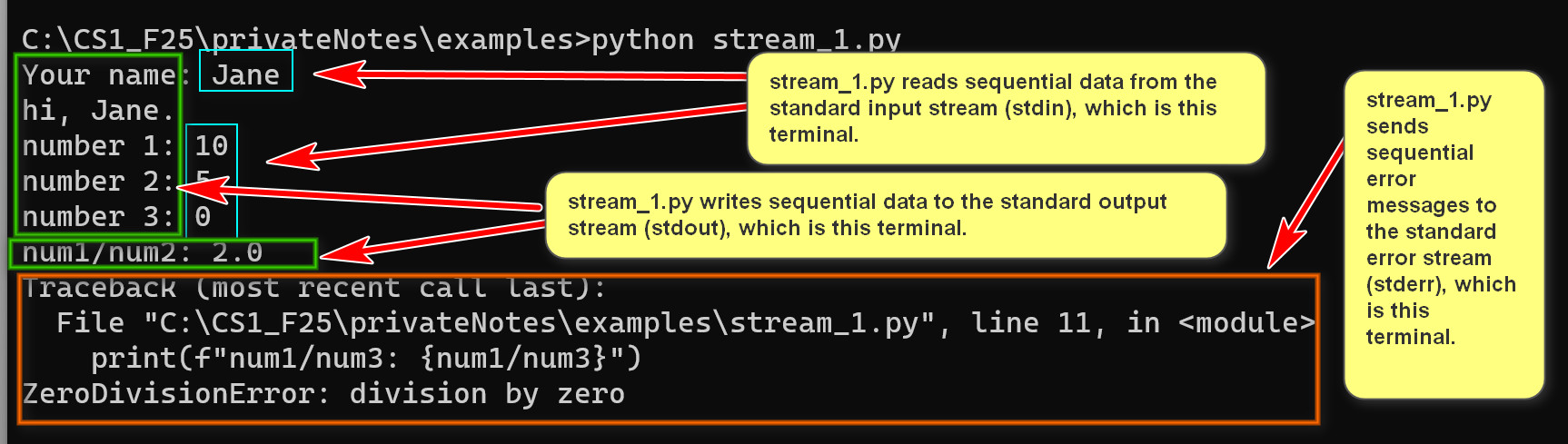
Example:
# standard I/O stream in Python.
name = input("Your name: ")
print(f"hi, {name}.")
num1 = int(input("number 1: "))
num2 = int(input("number 2: "))
num3 = int(input("number 3: "))
print(f"num1/num2: {num1/num2}")
print(f"num1/num3: {num1/num3}")
3. Input files
3.1 Basics
Example:
# Open a file with mode "r" for read and returns a file object.
f = open("infile_1.py", "r")
# the content of the file object is read and used but not kept.
print(f.read())
print(f"""The second read() returns "".
The file content can be read only once.
print(f.read())
""")
print(f.read())
f.close()
import sys
# Read a file specified by the first command line argument.
# Primt the number of characters in the file and then the file itself.
if len(sys.argv) < 2:
print("Usage: infile_2.py <filename>")
sys.exit(1) # Exit with an error code
filename = sys.argv[1]
# The default mode is "r" but explicitly specifying the mode as "r" provides clarity of intention.
f = open(filename, mode="r")
s = f.read()
print(f"Number of characters in the file: {len(s)}\n")
print(s)
f.close()
3.2 Closing Files
with open(infile_name, 'r') as f:
# block of code within the with statement
# ...
# The file is automatically closed when exiting the with block,
# even if exceptions occur within the block.
Example:
import sys
# Read a file specified by the first command line argument.
# Primt the number of characters in the file and then the file itself.
if len(sys.argv) < 2:
print("Usage: infile_3.py <filename>")
sys.exit(1) # Exit with an error code
filename = sys.argv[1]
# The default mode is "r" but explicitly specifying the mode as "r" provides clarity of intention.
with open(filename, mode="r") as f:
s = f.read()
print(f"Number of characters in the file: {len(s)}\n")
print(s)
3.3 I/O and File Exceptions
Example:
import sys
# Read a file specified by the first command line argument.
# Print the number of characters in the file and then the file itself.
if len(sys.argv) < 2:
print("Usage: infile_4.py <filename>")
sys.exit(1) # Exit with an error code
filename = sys.argv[1]
try:
with open(filename, mode="r") as f:
s = f.read()
print(f"Number of characters in the file: {len(s)}\n")
print(s)
except FileNotFoundError:
print(f"The file {filename} cannot be found.")
sys.exit(1)
except Exception as e:
print(f"An error occurred: {e}"
Example:
import sys
# Read a file specified by the first command line argument.
# Print the number of characters in the file and then the file itself.
if len(sys.argv) < 2:
print("Usage: infile_4.py <filename>")
sys.exit(1) # Exit with an error code
filename = sys.argv[1]
try:
with open(filename, mode="r") as f:
for i,line in enumerate(f,1):
print(f"[{i}]: {line}", end='')
except FileNotFoundError:
print(f"The file {filename} cannot be found.")
sys.exit(1)
except Exception as e:
print(f"An error occurred: {e}")
3.4 Some tips
4. Output Files
4.1 print()
Format:
print(*objects, sep=' ', end='\n', file=sys.stdout, flush=False)
4.2 write()
Example:
list_1 = ["Hello", "world", "it is me.", 2048]
print(f"list_1: {list_1}")
try:
filename = 'output_1_out.txt'
with open(filename, 'w') as f:
print(f"list_1: {list_1}", file=f)
# Note that the int 2048 is converted to '2048' by print()
print("Hello", "world", "it is me.", 2048, file=f)
print("Hello", "world", "it is me.", 2048, sep=" :-) ", file=f)
print("Hello", "world", "it is me.", 2048, sep=" :-) ", end='\nbye bye\n', file=f)
except FileExistsError:
print(f"The file {filename} already exists.")
except Exception as e:
print(f"An error occurred: {e}")
# Append.
try:
with open(filename, 'a') as f:
f.write("\n\nThe following is written by write().")
f.write("No newline symbol automatically added by write().\n")
f.write(f"list_1: {list_1}")
# no FileExistsError for append mode.
except Exception as e:
print(f"An error occurred: {e}")